
 |
 |
 |
 |
 |
 |
 |




|
在使用 Online Testing Center 所提供的托福模擬考前,您的電腦須有 RealPlayer 的播放軟體,假如您沒有該項軟體,請依下列步驟下載 RealPlayer。
|
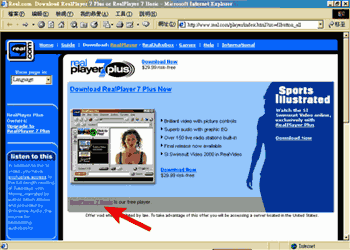
| 步驟 1: | 當您按下右邊的按鈕  時, 將會出現下列的網頁,提供您下載點選箭頭所指處之超連結: 時, 將會出現下列的網頁,提供您下載點選箭頭所指處之超連結:
|
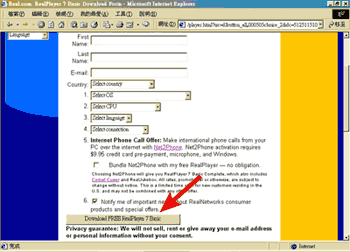
| 步驟 2: | 點選上述之超連結後,接著將出現下列之畫面,請依表格之要求來填寫資料,填寫完畢後,按下 "Download Free RealPlayer
7 Basic":
|
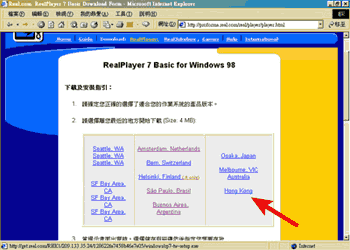
| 步驟 3: | 在按下 "Download Free RealPlayer
7 Basic" 後,將會出現下列畫面,依照畫面指引選擇 Hong Kong:
|
| 步驟 4: |
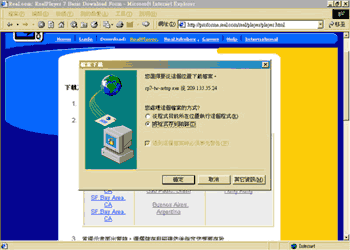
當您選完下載地點後,檔案即下載中, 並出現下列對話盒, 按下 "儲存檔案",再從 "檔案管理員" 中找出您的檔案存放那一個資料夾,並點選該檔案兩下,將會有儲存的動作發生:
|
| 步驟 5: | 按下 "Accept" 按鈕後,並依其步驟操作,最後您的電腦螢幕的右下方將會出現這個小圖型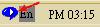 ,即表示您已成功地下載 RealPlayer 軟體. ,即表示您已成功地下載 RealPlayer 軟體.
|
|
TOEFL® is registered trademark of Educational Testing Services (ETS). Online Testing Center is not affiliated with ETS or the College Board. |
|
Copyright 1999 Ivy Telecommunications Services, Inc. All Rights Reserved. |
|
若對本公司有任何疑問,請email至onlinetc@mail.ivy.net.tw |